
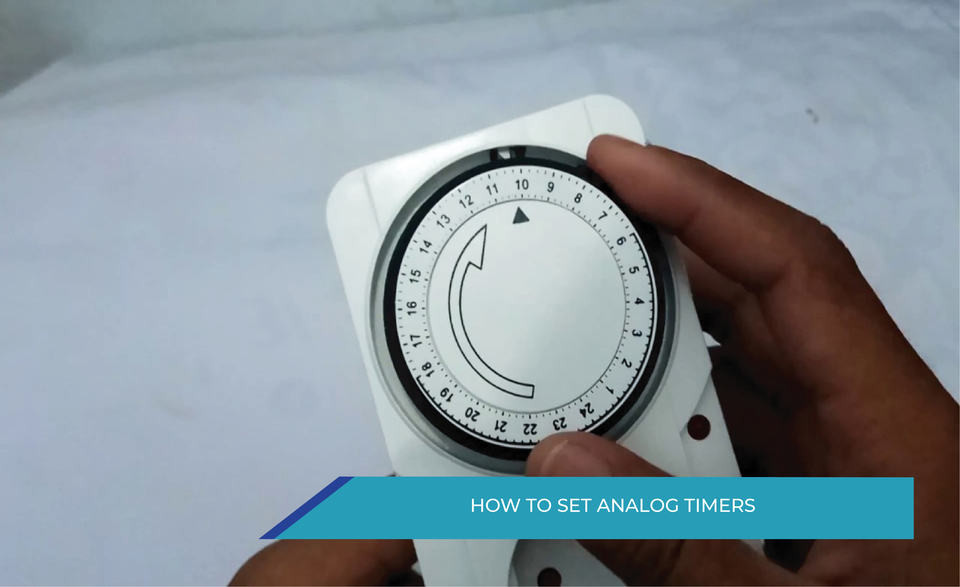
How To Set Analog Timers
Analog timers provide a simple way to control when electrical devices turn ON and OFF according to a set schedule. Although setting one may seem confusing at first, the process becomes much easier once you understand how the timer works and what its dials, indicators, segments, and operating modes do.
In this guide, you’ll learn what an analog timer is, how it differs from a digital timer, how its main components work, and how to set it step by step. We’ll also cover common setting mistakes and typical applications to help you use an analog timer correctly.
What Is an Analog Timer?
An analog timer is a time-control device used to automatically switch an electrical circuit or connected equipment ON and OFF at predetermined times. Unlike digital timers that use electronic displays and programming menus, analog timers use mechanical adjustment methods such as a rotating dial, pointer, or adjustable segments to set the desired operating schedule.
The user sets the current time and defines when the output should turn ON or OFF. The timer then follows this schedule and changes the electrical contact state at the selected times.
Analog timers are commonly used in applications where simple and repetitive time control is required, such as lighting systems, pumps, fans, and basic automation systems.
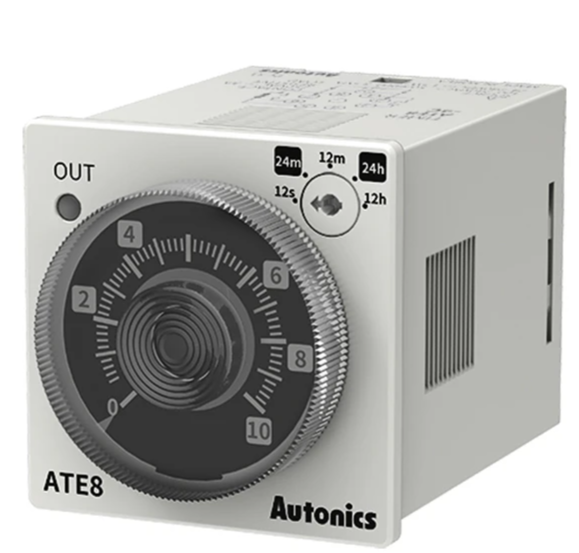
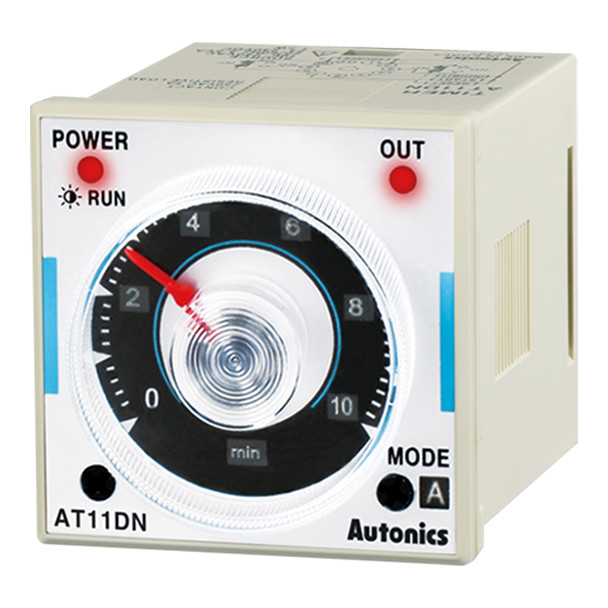
Fig1. Example of an analog timer with a mechanical time-setting dial. The dial allows users to adjust timing parameters for controlling electrical operations.
Difference Between Analog and Digital Timers
The main difference between analog and digital timers is the way time settings are configured and managed.
Analog timers use mechanical components for adjustment. They are usually simple to operate and suitable for applications that require a fixed ON/OFF schedule. However, their adjustment options and programming flexibility are generally more limited.
Digital timers use electronic circuits, displays, and buttons to configure time settings. They typically provide more precise control and allow users to create more complex schedules, such as different programs for different days or multiple switching events.
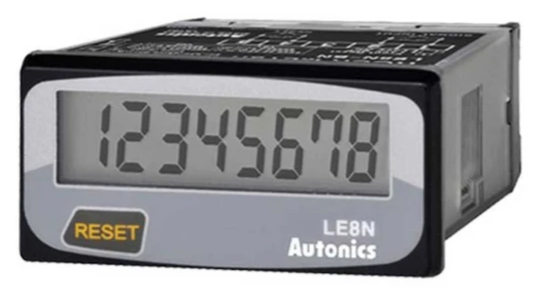
Fig 2. Analog timers typically use mechanical dials or selectors for adjustment, while digital timers use electronic displays and buttons for programming.
|
Feature |
Analog Timer |
Digital Timer |
|
Setting method |
Dial, pointer, or mechanical segments |
Buttons and digital display |
|
Time display |
Mechanical scale or indicator |
LCD or LED display |
|
Programming flexibility |
Suitable for simple schedules |
Suitable for complex schedules |
|
Adjustment process |
Simple and direct |
More options but requires menu settings |
|
Typical use |
Basic ON/OFF control |
Advanced time-based control |
Choosing between an analog and digital timer depends on the application requirements. Analog timers are suitable when simplicity and straightforward operation are important, while digital timers are preferred when higher precision and more flexible programming are needed.
Understanding the Parts of an Analog Timer Before Setting It
Before setting an analog timer, it is important to understand the main parts used for adjusting time and controlling the switching operation. Although the design may vary between different timer models, most analog timers include similar components.
1. Time Dial or Rotating Scale
The time dial is the main part used to set or read the current time. It usually contains hour markings around the dial and rotates according to the timer mechanism.
To set the timer correctly, the dial must first be aligned with the current time indicator.
2. Current Time Indicator
The current time indicator is a fixed mark or pointer on the timer that shows the reference position for setting the present time.
When adjusting the timer, the dial is rotated until the current time matches this indicator.
3. ON/OFF Segments or Setting Pins
Many analog timers use adjustable segments, pins, or tabs around the dial to define when the output should turn ON or OFF.
By moving these segments, the user creates a switching schedule. For example, a selected group of segments can represent the period when a connected device should operate.
4. Manual/Automatic Mode Selector
Some analog timers include a mode selector that allows the user to choose between manual operation and automatic scheduling.
Common modes include:
- ON: The output remains continuously switched on.
- OFF: The output remains continuously switched off.
- AUTO: The timer follows the programmed schedule.
For normal timed operation, the selector should usually be placed in the automatic mode.
5. Output Terminals or Connection Points
In industrial analog timers, terminals are used to connect the timer to the electrical circuit or controlled equipment. These connections allow the timer to switch the load according to the programmed time settings.
Before installation or adjustment, the terminal configuration should be checked according to the timer documentation.
Understanding these parts makes the setting process easier because each adjustment has a specific purpose: setting the current time, defining the operating schedule, and selecting how the timer controls the connected device.
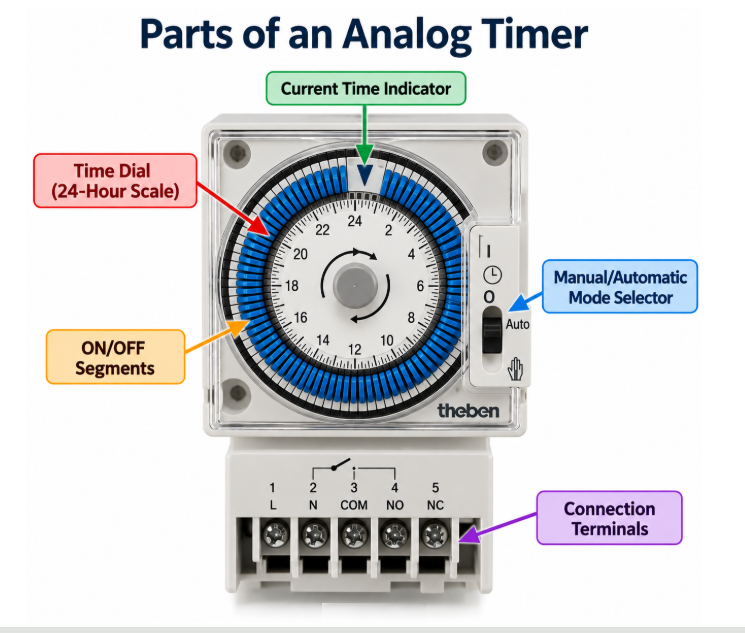
Fig 3. Main parts of an analog timer, including the time dial, current time indicator, ON/OFF segments, mode selector, and connection terminals.
How Does an Analog Timer Work?
An analog timer works by using a time-based mechanism to control when an electrical circuit is switched ON or OFF. Instead of using a digital display and electronic programming, it relies on a rotating dial, mechanical movement, or adjustable switching elements to define the operating schedule.
The timer follows a simple process:
- Time reference is set
The user aligns the timer with the current time so the internal mechanism can follow the correct schedule. - Switching periods are defined
The user sets specific periods when the connected device should operate. These settings are usually made using adjustable pins, segments, or a mechanical dial. - Timer mechanism moves according to time
The internal mechanism continues moving through the programmed time cycle. As the timer reaches the selected switching points, it activates or deactivates the output contact. - Output switches the connected device
When the programmed time is reached, the timer changes the state of its output, allowing the connected equipment to turn ON or OFF.
For example, if an analog timer is programmed to operate a lighting system from 6:00 PM to 11:00 PM, the timer will keep the circuit OFF outside this period and switch it ON during the selected operating time.
The main advantage of an analog timer is its simple and direct operation. It is designed for applications where a repeated ON/OFF schedule is needed without complex programming.


How to Set an Analog Timer Step by Step
Setting an analog timer involves adjusting the current time and defining the periods when the connected device should turn ON and OFF. Although the exact design may vary between timer models, most analog timers follow a similar setting process.
1. Identify the Timer Controls
Before making any adjustments, identify the main control elements of the timer, such as the time dial, current time indicator, ON/OFF segments or pins, and operating mode selector.
Understanding these parts helps prevent incorrect settings and makes the adjustment process easier.
2. Set the Current Time
The first step is to align the timer with the actual current time.
Rotate the timer dial until the current time matches the reference mark or indicator on the timer. This allows the timer mechanism to follow the correct daily schedule.
For example, if the current time is 3:00 PM, adjust the dial until the 3:00 PM position aligns with the timer’s time indicator.
3. Set the ON and OFF Periods
After setting the current time, define when the connected device should operate.
Depending on the timer design, this is done by adjusting segments, pins, or switches around the dial. The selected positions determine the periods when the output will be activated or deactivated.
For example:
- Set the ON period from 6:00 PM to 11:00 PM to operate a lighting system.
- Leave the remaining time periods in the OFF position.
4. Select the Operating Mode
Many analog timers include a mode selector with options such as ON, OFF, and AUTO.
For scheduled operation, select the AUTO mode. This allows the timer to follow the programmed schedule.
Other modes are typically used for temporary manual control:
- ON: Keeps the output continuously active.
- OFF: Keeps the output continuously inactive.
- AUTO: Allows automatic operation according to the timer settings.
5. Test the Timer Operation
After completing the settings, check that the timer operates as expected.
Verify that:
- The current time is correctly aligned.
- The programmed ON and OFF periods are correct.
- The timer switches the connected device at the selected times.
If the device does not operate correctly, review the time setting, mode selection, and switching schedule.
Following these steps allows an analog timer to be configured for simple and reliable automatic time control.
Common Mistakes When Setting an Analog Timer
Even when an analog timer appears to be set correctly, a small adjustment error can cause the connected device to operate at the wrong time or not operate at all. If the timer is not working as expected, check these common mistakes.
Incorrect Current Time Setting
One of the most common mistakes is setting the ON/OFF schedule without correctly aligning the timer with the current time. If the current time is incorrect, the entire operating schedule will also occur at the wrong time.
Pay particular attention to AM/PM or day/night markings on timers that use a 12- or 24-hour cycle.
Incorrect ON/OFF Segment Positions
The position used for ON and OFF periods is not identical on every analog timer. On some models, pressing a segment may indicate an ON period, while another design may use the opposite arrangement.
Check the markings or manufacturer instructions before setting the segments or pins.
Leaving the Timer in Manual Mode
A correctly programmed timer may still ignore its schedule if the operating selector is set to manual ON or OFF.
After programming, make sure the timer is in AUTO or the equivalent automatic operating mode.
Misreading the Time Intervals
Each segment or pin represents a specific time interval, which can vary by timer. Assuming that every segment represents the same number of minutes can result in an incorrect schedule.
Check the timer scale to determine the interval represented by each segment before programming the operating period.
Expecting an Immediate Switching Response
After programming the timer, its output state may depend on the current position within the programmed schedule. Changing the settings does not necessarily mean that the connected device will immediately switch ON or OFF.
For reliable operation, confirm the current time, programmed switching periods, and operating mode, and follow the instructions provided for the specific timer model.
Where Are Analog Timers Used?
Analog timers are commonly used in applications where a simple and repeated ON/OFF schedule is required. They are suitable for controlling equipment that needs to operate at specific times without complex programming.
Typical applications include:
Lighting Control
Analog timers are often used to switch lighting systems ON and OFF at scheduled times, such as outdoor lights, display lighting, or basic lighting installations.
Pumps and Fans
They can be used to control pumps, ventilation fans, and other equipment that only needs to operate during selected time periods.
Simple Automation Systems
In basic automation applications, analog timers provide a straightforward way to control the operating time of electrical devices without requiring advanced programming functions.
Industrial Control Applications
Some industrial control systems use analog timers where fixed and repetitive timing operations are required. Their simple adjustment method can be useful in applications where complex scheduling is not necessary.
Analog timers are most suitable when the required operation is based on a regular schedule. For applications that require multiple programs, higher timing accuracy, or more flexible control, digital timers may be a more appropriate option.
Conclusion
Analog timers provide a simple way to control equipment according to a predetermined ON/OFF schedule. Once you understand how the timer works and recognize its main controls, setting the current time and programming the required operating periods becomes relatively straightforward.
However, analog timer designs and setting methods can vary between models. Always check the markings and instructions for your specific timer, especially when determining ON/OFF segment positions, time intervals, and operating modes.
For applications that only require simple, repetitive scheduling, an analog timer can be a practical solution. When more precise timing or complex programming is required, a digital timer may be more suitable.
Frequently Asked Questions About Analog Timers
What is an analog timer?
An analog timer is a time-control device used to automatically switch an electrical circuit or connected equipment ON and OFF at selected times. It uses mechanical adjustment methods, such as a dial or adjustable segments, to define the operating schedule.
How does an analog timer work?
An analog timer works by following a time-based mechanism that changes the output state at programmed switching points. After the current time and ON/OFF periods are set, the timer activates or deactivates the connected device according to the schedule.
How do I set an analog timer?
To set an analog timer, first adjust the dial to the current time, then define the required ON and OFF periods using the timer’s adjustment segments or pins. Finally, select the automatic operating mode and check that the timer follows the desired schedule.
Why is my analog timer not turning ON or OFF at the correct time?
Incorrect current time settings, wrong ON/OFF segment positions, or leaving the timer in manual mode are common reasons for incorrect operation. Check the time setting, schedule, and operating mode before making further adjustments.
What is the difference between an analog timer and a digital timer?
Analog timers use mechanical settings such as dials or segments, while digital timers use electronic displays and programming controls. Analog timers are generally suitable for simple schedules, while digital timers provide more flexible programming options.
Can an analog timer be used for industrial applications?
Yes, analog timers can be used in applications where a simple and repetitive timing function is required. The suitability depends on the specific timer model, electrical requirements, and application conditions.
Recent Posts
-

Booster Pump Troubleshooting and Maintenance: How to Fix and Prevent Common Issues
1. Introduction Imagine turning on your faucet only to be greeted with a weak trickle of water when …22nd Apr 2025 -

Energy-Efficient Booster Pumps: Selection and Tips for Maximizing Performance
1. Introduction Imagine never having to deal with fluctuating water pressure, noisy pumps, or skyroc …19th Apr 2025 -

Booster Pumps for Sustainable Water Systems: Irrigation and Rainwater Harvesting Solutions
1. Introduction Water scarcity is no longer a distant threat—it’s a reality affecting millions …16th Apr 2025